Fast Travel
Fast Travel App
Supercharge your search bar. Turn your search bar into a command line for the web. Define short triggers and jump straight to the sites and searches you use most — available as a browser extension for Chrome and Firefox, and as a native Android app.
This is the v2 successor to fast-travel. The original self-hosted static page (v1) remains fully functional and available.
What you can do
Instead of bookmarks, history, and half-remembered URLs, type a short command and go straight there:
| Type… | …and go to |
|---|---|
g kittens |
a Google search for “kittens” |
ddg privacy |
the same search on DuckDuckGo |
r/technology |
the r/technology subreddit |
$AAPL |
an Apple stock quote |
yt lofi beats |
a YouTube search |
gh fast-travel |
a GitHub search |
w black holes |
a Wikipedia article search |
apps balatro |
the app on the right store for your device |
maps coffee |
nearby coffee on Google Maps |
hn |
Hacker News |
Every command is yours to configure — change the triggers, point them anywhere, or add your own.
Features
- Command-based navigation — short triggers route to any site or search you set up.
- Inline suggestions — autocomplete as you type, per command, from the search engines you choose.
- “I’m feeling lucky” — Ctrl/Cmd+Enter jumps straight to the first result via the
defaultLuckyUrlconfig field (browser extension, and Android with a hardware keyboard). - Bring your own config — keep your commands in a JSON file you host yourself and sync the same setup across every device and browser, or use the built-in defaults and edit them in-app.
- Device-aware routing — one command can resolve to the right destination per device (e.g.
appsopens Steam on desktop, the Play Store on Android). - Groups & themes — organize and personalize your command set, with light/dark modes and multiple styles.
- Browser extension — a fast, focused new tab page plus address-bar integration.
- Android app — a home-screen widget and the ability to launch installed apps straight from search.
- Private by design — no servers, no accounts, no ads, no tracking. Your settings stay on your device.
Install
| Platform | Link |
|---|---|
| Firefox |  |
| Android |  |
| Chrome / Chromium | GitHub Releases — see below |
Chrome install (GitHub Releases)
Fast Travel isn’t on the Chrome Web Store: its single-purpose policy doesn’t allow one extension to offer both a new tab page and search-engine integration, and splitting or stripping the extension would defeat the point. Install it from the latest release instead:
- Download
chrome-extension.zipand extract it to a folder you’ll keep around (Chrome loads the extension from that folder). - Open
chrome://extensions, enable Developer mode (top right). - Click Load unpacked and select the extracted folder.
Heads up: unpacked extensions don’t auto-update. Fast Travel shows a notice on the
new tab page when a newer release is available — download the new zip, extract it
over the same folder, and hit the reload icon on chrome://extensions.
Fast Travel pins its extension ID, so your commands, history, and settings follow the extension rather than the folder it was extracted into. Extracting a new release somewhere else won’t lose them.
Direct download (GitHub Releases)
Every release also ships installable artifacts on the Releases page:
- Android — download
app-release.apkand install it (you’ll need to allow installs from your browser/file manager in Android settings). This is a signed, ready-to-run build. - Firefox —
firefox-extension.zipis unsigned; release Firefox only installs signed add-ons, so use the Firefox Add-ons listing. (Developer/Nightly builds can load it as a temporary add-on.)
v1 vs v2
v1 (fast-travel) |
v2 (fast-travel-app) |
|
|---|---|---|
| Architecture | Self-hosted static page | Browser extension + Android app |
| Installation | Fork → deploy → set as search engine URL | Install from Chrome/Firefox store or Google Play |
| Hosting required | Yes (GitHub Pages or own server) | No |
| Platform support | Any browser with custom search engine support | Chrome, Firefox, Android only |
| Config | Edit config.json in your fork |
Remote URL sync or local in-app editing |
| Search suggestions | Google only; browser/OS dependent | All platforms; site-specific suggestions per command |
Choose v1 if you prefer no browser extension, need any-browser support, or want a fully self-hosted solution.
Choose v2 if you want a native Android app, one-click install, or cross-device config sync via URL.
Quick Start
- Install the extension or Android app
- Open Settings → Configuration → set a remote config URL (or use the built-in default)
- Type a command in your browser’s address bar or the Android search widget
Demo
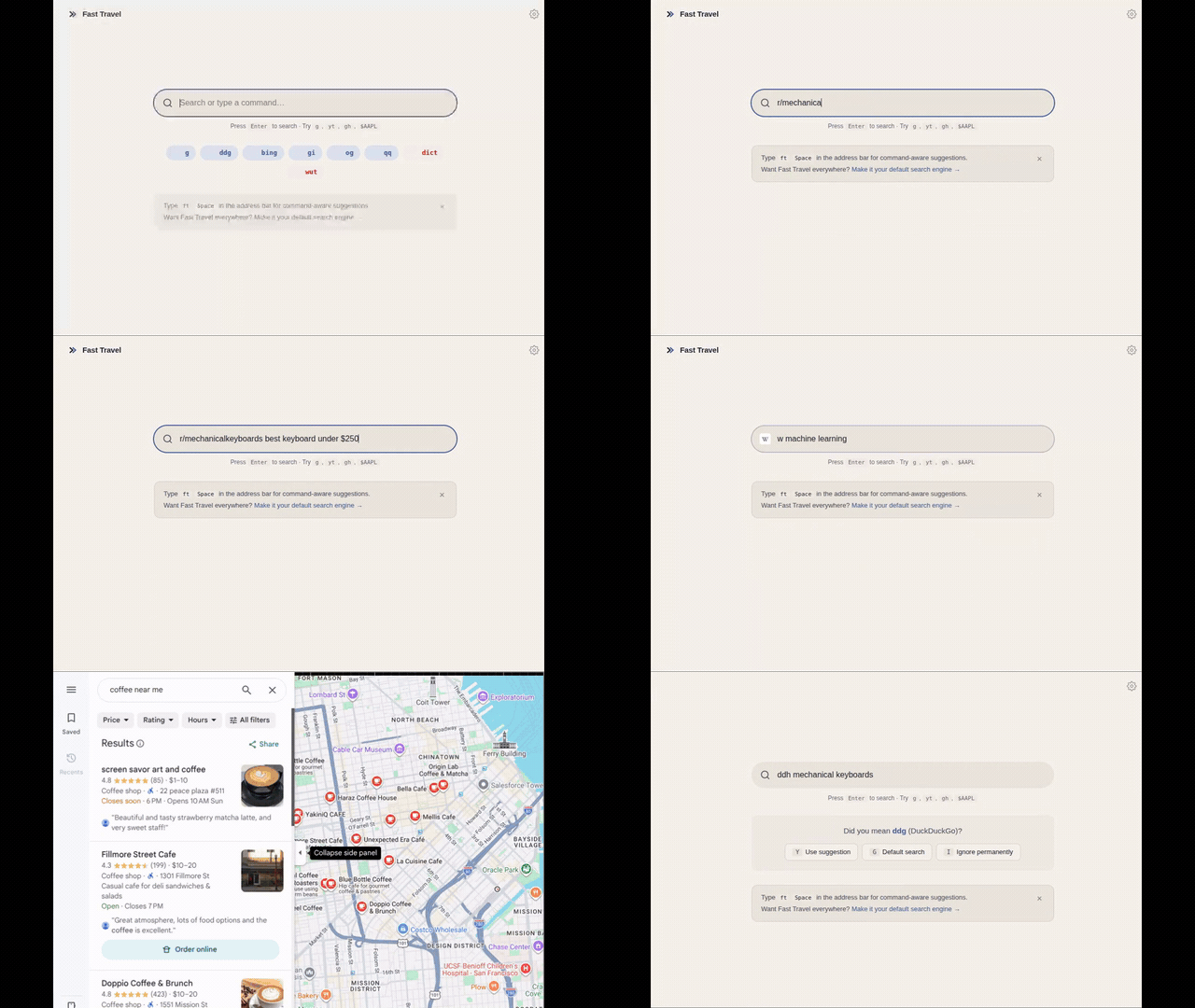
Type a command, get redirected — straight from the new-tab search bar, with live
suggestions as you go. A few examples: g mechanical keyboards (Google),
r/mechanicalkeyboards (a subreddit), yt lofi hip hop radio (YouTube),
w machine learning (Wikipedia), $TSLA (a stock quote).
On Android
The same commands run from the Android search bar — and open the matching native app when it’s installed (YouTube, Wikipedia, Maps), falling back to the browser otherwise.

Development
Prerequisites
- Node.js 22+
- JDK 17+
- Android SDK (API 36)
Extension
cd extension
npm install
npm run build          # Chrome
npm run build:firefox  # Firefox
npm test               # Unit tests
npm run test:e2e       # End-to-end tests (requires Chrome)
Android
cd android
./gradlew assembleDebug   # Debug APK
./gradlew test            # Unit tests
./gradlew connectedAndroidTest   # Instrumented tests (requires device/emulator)
Config validation
node tools/validate-config.mjs
Contributing
See CONTRIBUTING.md.
License
MIT — see LICENSE.